React Query on Web and Mobile: Same Cache, Different Rules
Stale times, background refetching, and offline behavior that made sense on desktop and felt broken on a phone.
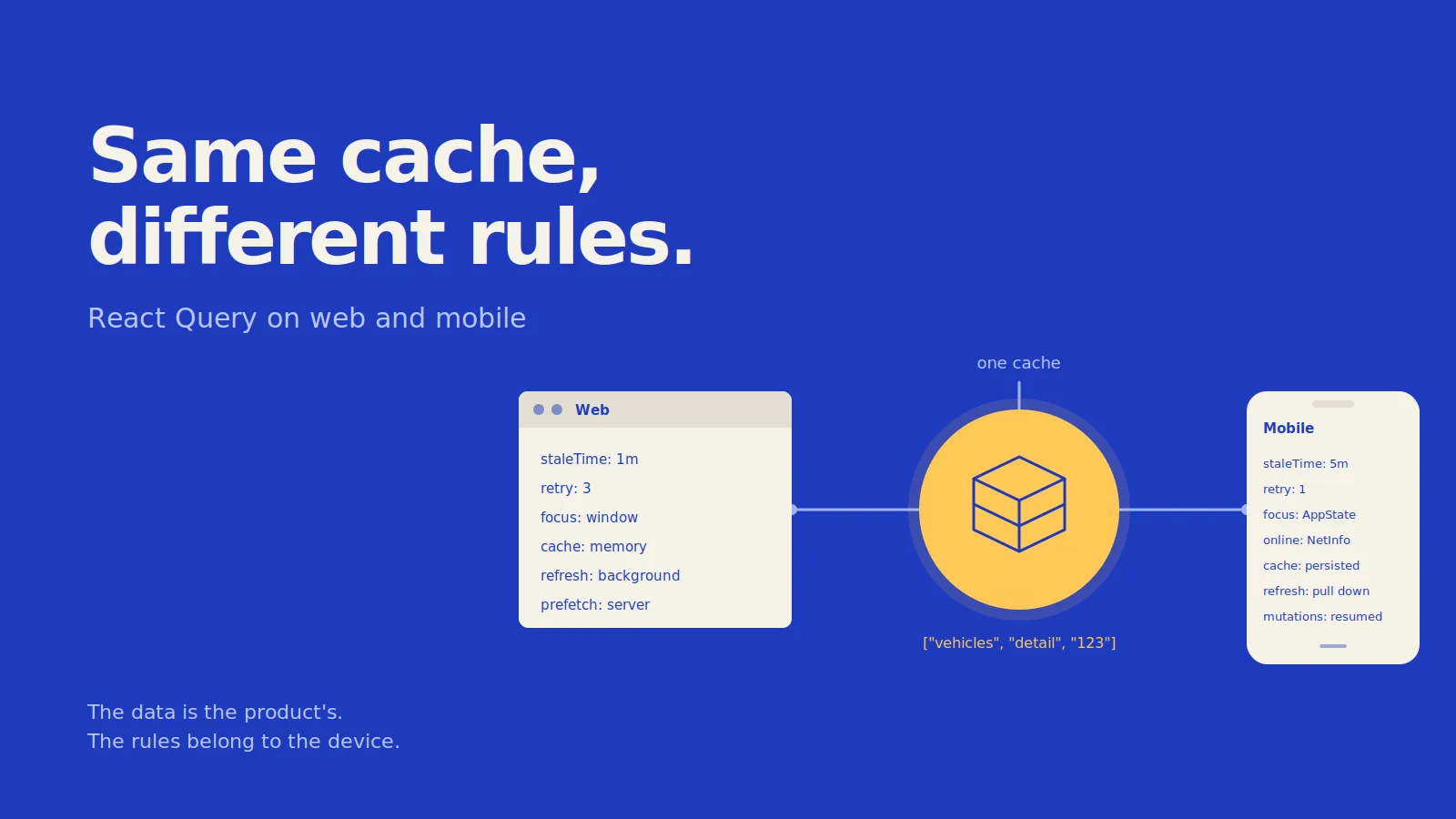
After splitting the product into a shared brain and two clients, React Query was one of the first things I moved into the shared layer.
At first, it seemed straightforward. The query keys were the same, the fetchers were the same, and even the Vehicle type was shared. I assumed the caching strategy could be shared too.
For a while, it worked.
Then the mobile app started behaving differently. Lists refreshed when users didn't expect them to. The app opened with a spinner even though it had displayed the same data a few seconds earlier. A warranty claim made from a parking garage could disappear when the app was killed.
None of these were bugs in React Query. The problem was treating the cache rules as if web and mobile had the same environment.
What Actually Shares Well
The part that worked well was sharing the query definitions.
I keep the query keys, query functions, and types together:
// packages/api/vehicles.ts
export const vehicleQueries = {
  all: () => ["vehicles"] as const,

  list: (filters: VehicleFilters) =>
    queryOptions({
      queryKey: [...vehicleQueries.all(), "list", filters],
      queryFn: () => api.get<Vehicle[]>("/vehicles", { params: filters }),
    }),

  detail: (id: string) =>
    queryOptions({
      queryKey: [...vehicleQueries.all(), "detail", id],
      queryFn: () => api.get<Vehicle>(`/vehicles/${id}`),
    }),
};
Both clients can consume the same definition:
const { data } = useQuery(vehicleQueries.detail(id));
The same applies to mutations. The claimWarranty mutation, its optimistic update logic, and the queries it invalidates are product behavior. They shouldn't need to know whether the caller is a web page or a mobile screen.
For example, when a warranty claim succeeds, invalidating the vehicle queries has the same meaning on both platforms.
This is the part I wanted to keep shared.
The problem started when I also shared the QueryClient.
The QueryClient Is a Client Concern
My first setup looked like this:
// packages/api/queryClient.ts
export const queryClient = new QueryClient({
  defaultOptions: {
    queries: {
      staleTime: 60_000,
      retry: 3,
    },
  },
});
Both applications imported the same instance and configuration.
That turned out to be the wrong abstraction.
A QueryClient contains decisions about when data becomes stale, when queries refetch, how retries work, and how long cached data stays around. Those decisions depend heavily on the environment where the client runs.
I eventually split the structure into:
packages/api/                 # queries, mutations, keys, types
apps/web/lib/query.ts         # web QueryClient
apps/mobile/lib/query.ts      # mobile QueryClient
The definitions stay shared, while each application controls how React Query behaves.
Focus Means Something Different
On the web, React Query can refetch stale queries when the browser window regains focus. That's usually useful. A user can switch to another tab, come back, and get fresh data without explicitly refreshing the page.
Mobile doesn't have the same browser focus lifecycle.
In React Native, you can connect React Query's focusManager to AppState:
// apps/mobile/lib/query.ts
import { AppState } from "react-native";
import { focusManager } from "@tanstack/react-query";

AppState.addEventListener("change", (status) => {
  focusManager.setFocused(status === "active");
});
The problem is that this can make refetching too aggressive.
A user checks a notification and returns two seconds later. The application becomes active again and visible queries may refetch immediately. On a phone, that is noticeable: the list can flicker, loading indicators can appear, and another network request is made over mobile data.
The solution wasn't to remove focus-based refetching completely. I gave mobile queries a longer staleTime.
For example:
// web
staleTime: 60_000

// mobile
staleTime: 5 * 60_000
The query itself is still the same. Only the definition of "fresh enough" changes between clients.
Online Is a Guess
Offline behavior is another area where the difference becomes obvious.
On the web, navigator.onLine is not perfect, but a desktop connection is generally stable enough that being offline is an exceptional case.
On mobile, temporary connectivity loss is normal. It can happen in an elevator, a parking garage, or while switching between Wi-Fi and cellular.
React Query provides onlineManager for this, but React Native needs a native network source such as @react-native-community/netinfo:
// apps/mobile/lib/query.ts
import NetInfo from "@react-native-community/netinfo";
import { onlineManager } from "@tanstack/react-query";

onlineManager.setEventListener((setOnline) =>
  NetInfo.addEventListener((state) => {
    setOnline(!!state.isConnected);
  })
);
Without this, a request can fail in a temporary dead zone, trigger its retries, and eventually show an error even though the data is already available in the cache.
With the network state wired into React Query, queries can wait until connectivity returns instead of immediately behaving like the server is unavailable.
This made a noticeable difference in the number of situations where users thought the app was broken when the actual problem was simply temporary connectivity.
Retry Is Not Free
The shared configuration initially used:
retry: 3
That can be reasonable on the web. A temporary network problem or server hiccup may succeed on the second attempt without the user noticing.
On mobile, the same retry policy can make a failed request feel much worse. With a poor connection, users may spend several seconds waiting for retries that are unlikely to succeed.
For queries, I reduced the retry count to one and preferred showing cached data when it was available. A background refresh can fail without preventing the user from seeing the data they already have.
Mutations are different.
A warranty claim is an action the user expects to complete, so retrying a mutation can be more important than retrying a read. If the connection drops after the user submits the claim, silently giving up isn't a great experience.
The retry strategy therefore depends on what the operation represents, not just on the fact that it uses React Query.
Where the Cache Lives
This was also behind the disappearing warranty claim.
On the web, the query cache normally lives in memory. That's usually fine because tabs remain open, and a page reload is a relatively cheap operation. With Next.js, data can also be prefetched on the server and hydrated into the client:
// apps/web/app/vehicles/[id]/page.tsx
export default async function Page({ params }) {
  const queryClient = getQueryClient();

  await queryClient.prefetchQuery(
    vehicleQueries.detail(params.id)
  );

  return (
    <HydrationBoundary state={dehydrate(queryClient)}>
      <VehicleDetail id={params.id} />
    </HydrationBoundary>
  );
}
The client can start with data that was already fetched on the server.
Mobile doesn't have that advantage. There is no server-rendered page to hydrate, and the operating system can terminate the application at any time.
That means an in-memory cache disappears when the process is killed.
For mobile, I persist the query cache:
// apps/mobile/lib/query.ts
import { persistQueryClient } from "@tanstack/react-query-persist-client";
import { createAsyncStoragePersister } from "@tanstack/query-async-storage-persister";

persistQueryClient({
  queryClient,
  persister: createAsyncStoragePersister({
    storage: AsyncStorage,
  }),
  maxAge: 24 * 60 * 60 * 1000,
});
Now the application can start with previously cached data and refresh it in the background.
The warranty claim was a different problem. The mutation happened while the device was offline, then the application was backgrounded and eventually killed by the OS. The pending mutation disappeared with the process.
Persisting mutations and calling resumePausedMutations() during startup solved that case.
On mobile, persisting mutations can be just as important as persisting queries when an action needs to survive a temporary loss of connectivity or an application restart.
Refresh Is a Gesture
There is also a small but important difference in how users expect to refresh data.
On the web, users usually reload the page or let background refetching handle freshness.
On mobile, users often pull down to refresh.
That action should be connected to an explicit refetch() rather than treated like another automatic refresh:
<FlatList
  refreshing={isRefetching && !isFetchingNextPage}
  onRefresh={() => refetch()}
  ...
/>
The distinction between isRefetching and isFetching matters here.
If the refresh indicator is tied to every fetch, it can appear during background refetches that the user didn't initiate. The result is a list that feels like it's constantly doing something on its own.
The UI should make a distinction between background synchronization and an explicit user action.
What the Split Looks Like
The shared package owns the product-level definitions:
// packages/api
export { vehicleQueries, warrantyQueries } from "./queries";
export { useClaimWarranty } from "./mutations";
Each application creates its own client:
// apps/web/lib/query.ts
export function makeQueryClient() {
  return new QueryClient({
    defaultOptions: {
      queries: {
        staleTime: 60_000,
        retry: 3,
      },
    },
  });
}
And mobile can apply its own behavior:
// apps/mobile/lib/query.ts
export function makeQueryClient() {
  const client = new QueryClient({
    defaultOptions: {
      queries: {
        staleTime: 5 * 60_000,
        retry: 1,
        gcTime: 24 * 60 * 60 * 1000,
      },
      mutations: {
        retry: 3,
      },
    },
  });

  wireFocus();
  wireOnline();
  persist(client);

  return client;
}
The queries don't need to know which client is using them, and the clients don't need to know the business meaning behind every query.
That separation is what made the shared layer easier to reason about.
The Rule I Took Away
The data model and query definitions are shared because the product is shared. A Vehicle with ID 123 represents the same vehicle whether it is displayed on a web page or a mobile screen.
The cache behavior, however, belongs to the client.
A phone can lose connectivity, switch between networks, be suspended by the operating system, and rely on a user gesture for refresh. A desktop browser has a very different environment.
React Query makes this separation fairly straightforward once you distinguish between two questions:
What is this data?
That's the shared layer.
How should this client treat that data?
That's where the platform-specific QueryClient belongs.
Share the queries and mutations. Let each client decide how aggressively it caches, refetches, retries, persists, and responds to its environment.
Comments
Nothing here yet. Be the first.